Discounts & Promotions
Shopify Discount Code: Create, Share and Combine (2026)
Nov 18, 2026 · 5 min read
How to create a Shopify discount code, share it as a link, combine it with other discounts, and when an automatic discount works better.

Free for Shopify brands: your paid membership plan, modelled on your store, in your inbox within the hour.
Get my free plan →
A Shopify discount code is a word like WELCOME10 that a customer types at checkout to get a lower price. It is still one of the most useful promotion tools on Shopify, because you decide exactly who gets the code.
Codes are not the only option. Shopify also runs automatic discounts that apply on their own when a cart qualifies. Picking the right one saves margin and a lot of “my code doesn’t work” emails.
Key takeaways
Codes target people: use them for subscribers, influencers or a single customer.
Combining has limits: up to 5 product or order codes and 1 shipping code per order, set per discount.
Automatic discounts remove friction: tiered, BOGO, free gift and B2B offers apply without typing anything.
What is a Shopify discount code?
A discount code is one of Shopify’s two discount methods. The other is the automatic discount. Shopify’s developer documentation puts it simply: automatic discounts apply when their conditions are met, while a code discount is redeemed with a code you share.
Both methods support the same main discount types:
Amount off products. A percentage or fixed amount off specific products or collections.
Amount off order. A percentage or fixed amount off the order subtotal.
Buy X Get Y. For example buy two, get one free.
Free shipping. Shipping becomes free or cheaper when conditions are met.
Every discount also has a class: product, order or shipping. The class decides what it can combine with later.
How to create a discount code on Shopify
You create codes in the Shopify admin under Discounts:
Click Create discount and choose the type: amount off products, amount off order, Buy X Get Y or free shipping.
Choose Discount code as the method.
Type your own code or let Shopify generate one.
Set the value: a percentage, a fixed amount, or the free item for Buy X Get Y.
Pick what it applies to and who is eligible: all customers, segments or specific customers.
Add minimum requirements if needed, such as a minimum purchase amount or quantity.
Set usage limits, for example one use per customer.
Choose which other discounts it can combine with.
Set the start and end dates, then save.
Limits to know before you plan a campaign
100 entitlements per code. A code can target up to 100 specific customers, products and variants. Above that, use collections or segments.
20,000,000 codes per store. Apps cannot raise this limit.
No special characters. They can break the code in your checkout URL.
Source: Shopify Help Center.
How to share a Shopify discount code
The classic way is to print the code in an email, an influencer post or a banner. Shopify can also turn a code into a shareable link that adds the code at checkout, so customers do not type anything.
Codes work best when you want control over the audience:
Influencer and affiliate campaigns, with one code per partner so you can see who drove the sale.
Email and SMS offers, such as a welcome code for new subscribers.
Win-back offers for customers who have not ordered in a while.
Customer service gestures, where support sends a one-off code.
Can you combine discount codes on Shopify?
Yes, within limits. According to Shopify’s Help Center on combining discounts:
Up to 5 product or order discount codes and 1 shipping discount code can be used on the same order.
Up to 25 active automatic discounts per store, including discounts created by apps.
All merchants can combine order discounts with free shipping, product discounts with free shipping, and product discounts on separate items.
Product plus order and order plus order combinations are available to eligible stores, for example stores without checkout.liquid customizations.
Two product discounts on the same item require Shopify Plus.
Combinations apply on the Online Store, the Storefront API and Shopify POS.
Discounts apply in a fixed order: product discounts first, then order discounts on the reduced subtotal, then shipping. When automatic discounts are active and a customer enters codes, Shopify can apply the best combination your settings allow.
Why a code “does not work”
Most often it is a combination setting. If your automatic sale does not allow combining with order discounts, a WELCOME10 order code will not stack with it. See Shopify discount stacking rules explained.
Discount code or automatic discount: which should you use?
Question | Discount code | Automatic discount |
How does it apply? | The customer enters the code or opens a shareable link. | It applies by itself when the cart meets the conditions. |
Best for | Targeted audiences: subscribers, influencers, one customer. | Storewide sales, tiered offers, BOGO, free gifts, wholesale pricing. |
Shopify limit | Up to 5 product or order codes and 1 shipping code per order. | Up to 25 active automatic discounts per store. |
Customer effort | Has to find and type or click the code. | None. |
Many stores use both: an automatic offer for everyone, plus codes for specific audiences. Combination settings decide what can stack.
When native discounts are not enough
Native discounts cover most simple offers. They get harder when a rule depends on several conditions at once, like “10% off for logged-in customers in Canada over $150, but not on sale items”.
Shopify’s answer is Shopify Functions. A Discount Function runs inside checkout and calculates the discount in real time. Apps built on Functions let you create new discount types without custom code.
How Flowly fits in
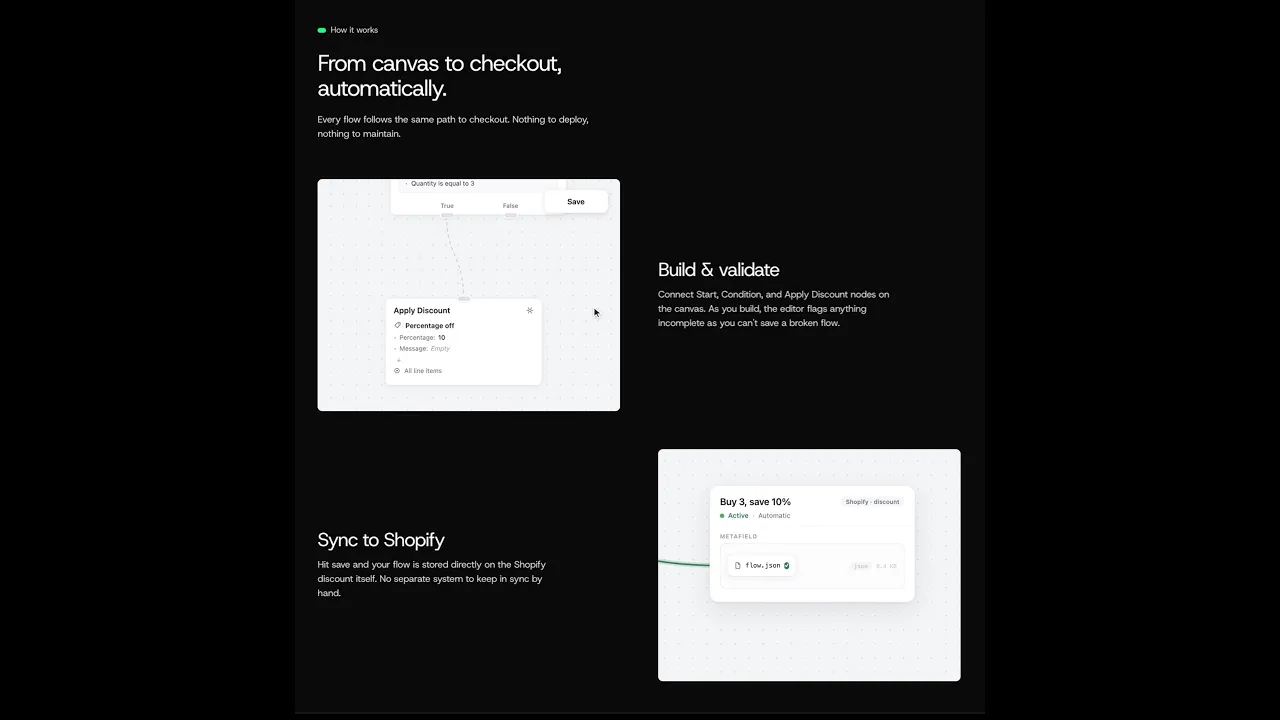
Flowly: Discount Functions is a Shopify app built on Shopify Functions. You build automatic discounts on a visual canvas, or describe the offer to the AI assistant and it builds the flow for you.

With Flowly you can create:
Tiered and volume discounts, where savings grow with cart value or quantity.
BOGO and Buy X Get Y offers, including free gifts with purchase, with no code needed.
Free shipping rules by country, cart size or shipping option.
B2B and wholesale rules by company, location, market or customer segment.
Conditions include cart subtotal, customer tag, customer segment, market, order count and logged-in status. Each rule runs as a native Shopify Function at checkout and follows your combination settings.

Every change is versioned, and a dashboard shows how each active discount performs. Flowly is free on the Shopify App Store and has the Built for Shopify badge. See how Flowly works.
Step-by-step guides: tiered discounts without code, BOGO discounts without code and B2B discount rules.
FAQ
How many discount codes can a customer use on Shopify?
Up to 5 product or order discount codes and 1 shipping discount code on the same order, if each discount’s combination settings allow it.
How many automatic discounts can a Shopify store run?
Up to 25 active automatic discounts at the same time, including discounts created by apps.
Why is my Shopify discount code not working?
Check the active dates, usage limits, eligibility and minimum requirements first. Then check combinations. Our checkout discount fix list goes through each cause.
Do I need a discount code for a BOGO or free gift offer?
No. Buy X Get Y can be an automatic discount in Shopify, and apps like Flowly build BOGO and free gift rules that apply when the cart qualifies.
Want tiered, BOGO, free gift and B2B discounts that apply themselves? Flowly is free on the Shopify App Store.
Ask AI about this article
FREE · IN YOUR INBOX WITHIN THE HOUR
See what a paid membership would add to your store
Send us your store URL. We model your year-one revenue from a membership, design the program, and show it on your own product page and cart.


Book a meeting with our sales team now!
Create predictable revenue from the customers you already have.